
WordPress SEO Services For Faster, Cleaner & More Search-Friendly Websites
WordPress SEO is all about making sure that your WordPress website is technically sound, easier for Google to work with and more likely to benefit both searchers and businesses. Our WordPress SEO experts optimize the technical, content and plugin setup to improve the way your WordPress website is built and functions — the same rigor we apply across our organic SEO and technical SEO engagements.

A powerful foundation with room for improvement
While WordPress provides businesses with an extremely powerful foundation, this platform alone is not enough to guarantee high rankings.
WordPress websites often suffer from slow page speeds, poor title structures, low-quality archives, problematic category SEO setups, unnecessary indexed pages, plugin conflicts, lack of schema and irrelevant content.
WordPress SEO helps to fix these issues by auditing and optimizing the way a WordPress website is built and maintained.
Make sure that Yoast, Rank Math, SEOPress or other SEO plugins are configured correctly.
Give Google clear guidelines on what pages, posts, archives, categories and media URLs should be indexed.
Remove any unnecessary plugins, optimize images and code, and resolve theme-related performance issues.
Improve the overall page and post structure, categorization, headings and internal linking practices.
Reduce WordPress SEO issues caused by plugin updates, theme changes or other template-level modifications.
Small WordPress SEO issues with major consequences
WordPress websites often have a variety of technical issues that impact SEO performance — many of the same issues we resolve in our technical SEO engagements.
Yoast, Rank Math, SEOPress or other SEO plugins can be improperly configured and/or utilized.
Many WordPress themes, especially page builders, can make websites slower and less SEO-friendly.
The wrong set of plugins or incorrect WordPress SEO settings can cause major issues.
Category, tag, author, date and search result archives often have poor or conflicting SEO settings.
WordPress allows for the creation of attachment pages that are best avoided.
Post, page and category URLs are often poorly-structured or unnecessarily long.
Important pages lack structured data for services, FAQs, articles, breadcrumbs and other elements.
Key service and product pages and posts are not linked to internally often enough.
Old posts or pages and redesigned URLs often have redirect or 404 issues.
Posts lack optimized titles, headings, internal linking and structured content.
Blog categories are disorganized and not properly supported by content.
Important pages are blocked by robots.txt or excluded by noindex tags while low-value WordPress URLs are indexed.
What We Do In WordPress SEO
WordPress SEO is more than just adding keywords — we analyze the entire WordPress setup to see what technical optimization opportunities exist, and align every fix with your broader organic SEO strategy.
Proper Yoast, Rank Math, SEOPress and other SEO plugin setup.
Proper page and post titling, description writing and SEO template utilization.
Decide what pages, posts, archives, categories, URLs and media should be indexed by Google.
Ensure that the website's sitemaps are optimized.
Make sure that robots.txt is not blocking any important pages or resources.
Fix post, page and category URLs to make them more readable and SEO-friendly.
Optimize or remove unnecessary categories and tags that are hurting WordPress SEO.
Ensure that blog posts are properly structured, contain relevant internal links, schema and other elements.
Properly optimize key service and product pages to improve WordPress SEO.
Add the required structured data for services, organization, FAQs, articles, breadcrumbs and local SEO.
Check theme, plugin, image optimization, caching, Core Web Vitals and other performance issues.
Ensure that posts, pages, blog categories and other important sections are interlinked correctly.
Provide optimization advice for file size, compression, alt text and other image SEO aspects.
Ensure that there are no broken links or unnecessary redirects.
A practical WordPress SEO workflow
WordPress site analysis, SEO plugin review, page structure, indexation, crawlability, speed and content, plus a full Search Console review.
Organize WordPress SEO issues in order of importance so the highest-impact fixes happen first.
Fix plugin settings, schema, internal linking, page structure, optimize blog posts, categories and more.
Monitor indexed pages, follow WordPress SEO best practices and continue improving page content regularly.
Core WordPress SEO project elements
Review of WordPress SEO plugin configuration, indexation, content, speed, page structure and other aspects.
SEO plugin settings, sitemaps, metadata, structured data and social preview templates.
Crawlability, indexation issues, performance, sitemaps and indexing opportunities.
Remove unneeded URLs from WordPress sitemaps.
Review category, tag, author, date, attachment and other archive pages.
Optimize important pages and blog posts for better WordPress SEO.
Add structured data for pages/posts, services, organization, FAQs, breadcrumbs and local SEO.
Caching optimization, image compression, WordPress theme review, render-blocking files and more.
Proper interlinking of blog posts, pages, categories, services and other elements.
File size, compression, alt text, file naming conventions and more.
Clean up broken links, deleted-page issues, redirect chains and outdated URLs.
A clear monthly WordPress SEO report showing what was fixed, what improved and what to prioritize next.
SEO plugins are only as good as their configuration
Many WordPress websites utilize Yoast, Rank Math or SEOPress SEO plugins, but these tools are often misconfigured or underutilized. We review and optimize:
The goal is to make the plugin support SEO properly instead of just sitting there unused.
The main reasons why WordPress sites are slow or underperforming
WordPress speed problems often come from themes, plugins, images, scripts and poor hosting setup. We review:
Some themes have more inherent overhead than others.
Some scripts and CSS are loaded even when they are not needed.
Large file sizes decrease performance, especially on mobile devices.
Poorly-configured caching can cause a variety of performance and reliability issues.
Unneeded data can make the CMS slower, especially with caching disabled.
CSS and JavaScript that slow down rendering and interactivity.
The goal is not only to improve a score — it's to make WordPress pages faster and easier to use.
Different WordPress sites need different types of SEO
Service websites require optimized service pages, local SEO signals, internal linking structure, trust elements and more.
Blogs need well-optimized categories, topics, authors, article schema, internal linking and content updates.
Consultants benefit from better content organization, expertise-focused pages, service clarity and more.
Local business websites need Google Business Profile optimization, local schema, contact-related improvements and dedicated local SEO.
WooCommerce websites need product, category, sort/filter and schema-level optimizations — the core focus of our eCommerce SEO work.
Multi-service WordPress sites need better page organization, internal linking, keyword prioritization and more.
Make WordPress easier to manage and improve
WordPress SEO can help address multiple issues and make a website easier to maintain and grow.
A well-optimized WordPress website becomes easier to manage and easier to grow.
Things that change once WordPress SEO is done correctly
- SEO plugin is installed/configured incorrectly
- Sitemaps contain unneeded URLs
- Category/tag pages cause WordPress SEO issues
- Service pages are disorganized/unlinked
- Blog posts are not optimized for search
- Google Search Console shows WordPress SEO issues
- Old URLs lead to 404 errors or redirects
- Important pages do not perform as expected
- SEO plugin settings are optimized
- Archives are properly handled
- Pagespeed is improved
- Proper internal linking is utilized
- Schema is implemented for better search appearance
- Indexing issues are resolved
- Redirect issues are resolved
- Key pages are optimized for search
Why Choose 4Core Digital For Your WordPress SEO Needs
WordPress SEO requires both search marketing and platform-specific knowledge. The 4Core Digital team has extensive experience in WordPress-specific technical SEO aspects like themes, plugins, builders, archives, sitemaps and more.
Better understanding of the inner workings of WordPress themes, plugins, builders, templates and more.
Correct configuration of Yoast, Rank Math, SEOPress and other WordPress SEO tools.
Review core WordPress elements that impact speed, page experience and SEO.
Both visible and technical WordPress SEO aspects are reviewed and optimized.
Depending on the project, WordPress SEO issues can be directly resolved or recommended for development.
You will always know what WordPress SEO issues were resolved and what areas need additional attention.
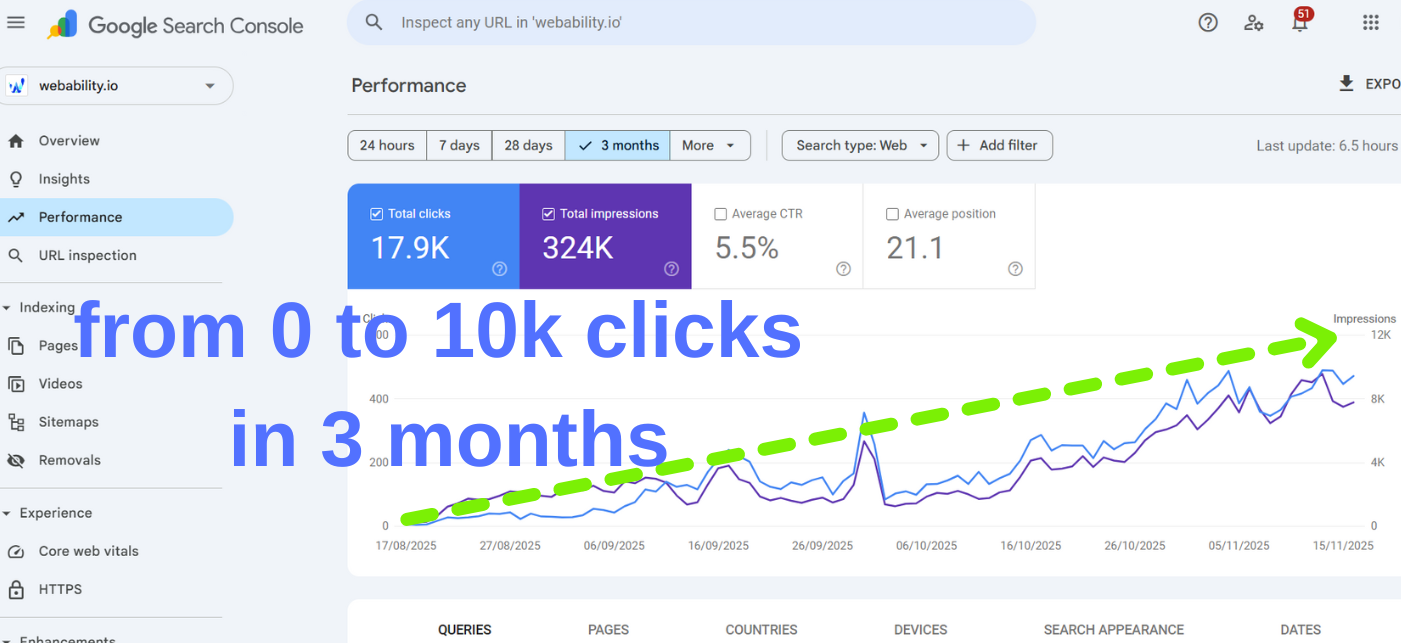
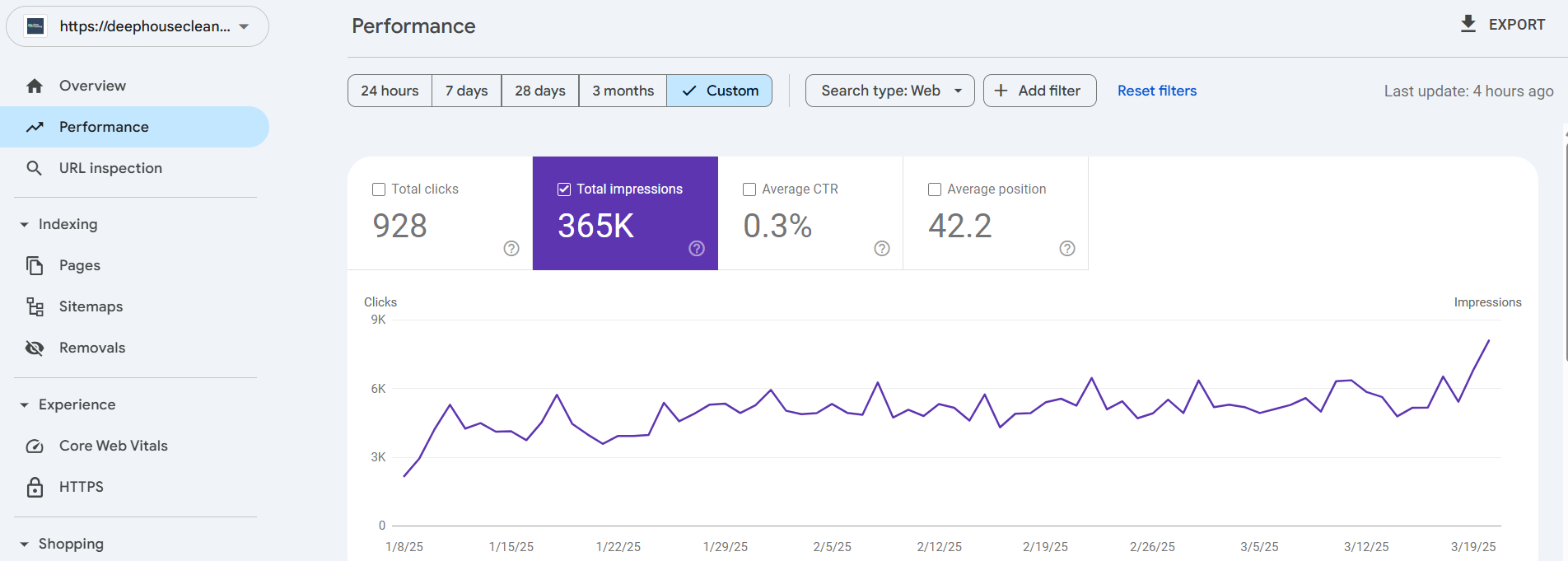
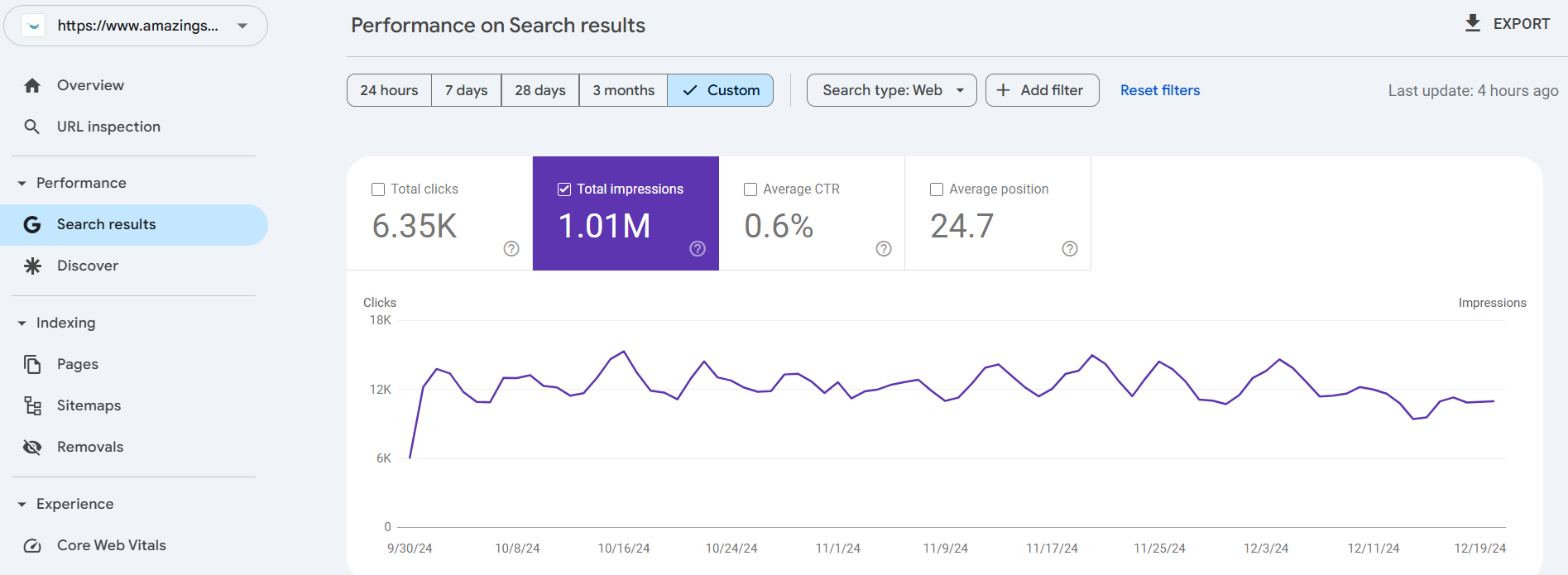
Real WordPress SEO case studies
See how structured SEO improvements can turn existing websites into stronger organic search assets.
What clients say about working with Hunny
"Hunny is brilliant to work with - he gets on with the job with no micromanagement needed. Fast worker and detail orientated. We're already seeing great results from the work he's done! Would recommend him to anyone."
"Hunny is committed to quality, reliable, clear communicator and very efficient. Highly recommend."
"It was a pleasure to work with Hunny, he was extremely professional and easy to work with, and the final result was exactly what I needed. I would definitely recommend this freelancer and will use his services again."
Frequently asked questions
What is WordPress SEO?
WordPress SEO is the process of optimizing a WordPress website so search engines can better crawl, index, understand and rank its pages.
Is WordPress good for SEO?
Yes, WordPress can be very SEO-friendly, but only when themes, plugins, sitemaps, metadata, schema, speed and content are configured properly.
Which WordPress SEO plugin is best?
Yoast, Rank Math and SEOPress can all work well. The best option depends on your website setup, features, comfort level and technical needs.
Do you work with Yoast SEO?
Yes. We can configure Yoast SEO settings, titles, meta descriptions, sitemaps, schema, breadcrumbs and indexing controls.
Do you work with Rank Math?
Yes. We can configure Rank Math modules, schema, redirects, sitemap settings, analytics and page-level SEO settings.
Can you improve WordPress speed?
Yes. We review themes, plugins, caching, images, scripts, database issues and hosting-related performance factors.
Can you fix WordPress indexing issues?
Yes. We review Search Console, sitemaps, robots.txt, canonical tags, archive settings and noindex rules to fix indexing problems.
Do you optimize WordPress blog posts?
Yes. We optimize blog titles, headings, content structure, internal links, schema, FAQs and topic coverage.
Can you help with WooCommerce SEO?
Yes. WooCommerce SEO can be included, especially for product pages, category pages, schema, filters, speed and indexation issues.
What do you need to start?
We usually need WordPress admin access, Google Search Console, Google Analytics, current SEO plugin details and a list of priority pages or goals.
Ready to clean up and grow your WordPress SEO?
Get a free WordPress SEO audit and find out what is affecting your rankings, indexation, speed, content and search performance.