
Quick Answer: How Do You Do SEO For A New Website?
To do SEO for a new website, start with a clean website structure, keyword research, SEO-friendly service or product pages, technical SEO setup, indexability checks, unique metadata, internal links, sitemap submission, Google Search Console, GA4, schema markup, fast mobile performance and a content plan based on search intent.
The biggest mistake is launching first and thinking about SEO later. SEO should be part of the planning, design, development and content process before the website goes live.
| SEO Area | What To Do |
|---|---|
| Website structure | Plan pages around services, products, locations and search intent |
| Keyword research | Choose primary keywords before writing pages |
| Technical SEO | Check crawlability, indexing, sitemap, robots.txt and canonicals |
| Metadata | Add unique title tags and meta descriptions |
| Content | Write helpful pages that answer real search intent |
| Internal links | Link important pages together clearly |
| Tracking | Set up Google Search Console, GA4 and conversion tracking |
| Local SEO | Set up Google Business Profile and local pages if relevant |
| Speed | Optimize images, scripts and mobile performance |
| Content plan | Publish useful blogs and guides after launch |
Why SEO Matters Before And After Launch
SEO should not begin after a new website is already live. If the website is planned without SEO, you may end up with pages that look good but have no keyword focus, weak content, confusing structure or technical issues that block rankings.
A new website launch is the best time to build SEO correctly. You can plan the right pages, choose the right keywords, create clean URLs, write useful content, structure headings properly, set up tracking and avoid duplicate or thin pages from the start.
SEO before launch helps you
- Choose the right website structure
- Avoid missing important service pages
- Write content around search intent
- Create clean URLs and metadata
- Avoid duplicate pages
- Plan internal links
- Set up indexability correctly
- Avoid broken links after launch
- Submit the sitemap to Google
- Track performance from day one
SEO after launch helps you
- Monitor indexing and crawl issues
- Improve pages based on Search Console data
- Publish supporting content
- Build internal links between related topics
- Fix technical issues quickly
- Improve rankings over time
- Track leads, calls, forms and sales
- Grow topical authority
Start With A Clear Website Structure
A new website needs a structure that is easy for users and search engines to understand. Your website structure should reflect what your business offers, who you serve and which pages matter most.
If your website structure is unclear, Google may struggle to understand your most important topics. Users may also struggle to find the information they need before contacting, booking or buying.
Basic small business website structure
- Homepage
- About
- Services with individual service pages
- Locations or service areas
- Case studies or portfolio
- Reviews or testimonials
- Blog
- Contact
Startup website structure
- Homepage
- Product or solution page
- Feature pages
- Use case pages
- Pricing
- Blog or resources
- Case studies
- About
- Contact or demo page
eCommerce website structure
- Homepage
- Main categories
- Subcategories
- Product pages
- Buying guides
- Reviews
- Blog
- Contact / support
- Policy pages
Do Keyword Research Before Writing Pages
Keyword research should happen before you write the main website pages. If you write pages first and add keywords later, the content may not match what people actually search for.
Keyword research helps you understand which services, products, locations, problems and questions have search demand. It also helps you decide whether a keyword needs its own page or should be part of a larger topic.
Local service business examples
- plumber near me
- emergency plumber in [city]
- drain cleaning service
- water heater repair
- plumbing company [city]
Startup examples
- project management software
- workflow automation tool
- best CRM for small teams
- [competitor] alternative
- software for remote teams
SEO agency website examples
- organic SEO services
- technical SEO services
- local SEO services
- SEO services USA
- SEO for startup companies
- single page SEO services
Create SEO-Friendly Core Pages
A new website should launch with the most important pages already optimized. These are usually the pages closest to revenue: homepage, main service pages, product pages, location pages, pricing or contact pages.
Homepage
Your homepage should explain who you are, what you offer, who you help, why visitors should trust you and where they should go next.
Service pages
Each main service should have its own focused page with a clear primary keyword, useful content, FAQs, proof and CTA.
Product or category pages
For eCommerce websites, product and category pages should have unique content, schema, internal links, optimized images and buying-intent copy.
Location pages
For local businesses, city or service-area pages should include original local content, services offered, nearby areas, reviews, FAQs and contact options.
Contact page
Your contact page should make it easy to enquire, call, book or request a quote. Forms should work and tracking should be set up.
Blog or resources
A blog can support SEO by answering customer questions and linking back to important service or product pages. See /blog/content-marketing-for-seo for how to structure a supporting content plan.
Set Up Technical SEO Foundations
Technical SEO is the foundation that helps search engines crawl, index and understand your website. If your technical setup is weak, even good content may struggle to rank.
Technical SEO checklist for a new website
- Clean URL structure
- HTTPS security
- XML sitemap
- robots.txt file
- Self-referencing canonical tags
- No accidental noindex tags
- Mobile-friendly design
- Page speed and Core Web Vitals
- Image optimization
- Schema markup
- No broken links
- Correct redirect rules
- Custom 404 page
- Internal linking
- No duplicate content
- Clean heading structure
- JavaScript rendering checks
- Metadata rendering in HTML
- Open Graph tags
Make Sure Google Can Crawl And Index The Website
A new website cannot rank if Google cannot crawl or index it. After launch, one of the first things to check is whether important pages are accessible to search engines.
Indexing checklist
- Important pages return a 200 status
- No important page has noindex
- robots.txt does not block important sections
- Sitemap includes only live canonical URLs
- Canonical tags point to the correct page
- Internal links point to final clean URLs
- No important pages are hidden behind scripts
- No pages are orphaned
- Redirects work correctly
- 404 pages are not included in the sitemap
Set Up Google Search Console And GA4
Google Search Console and Google Analytics 4 should be set up as soon as the new website goes live. These tools help you understand how Google sees your website and how users behave after they visit.
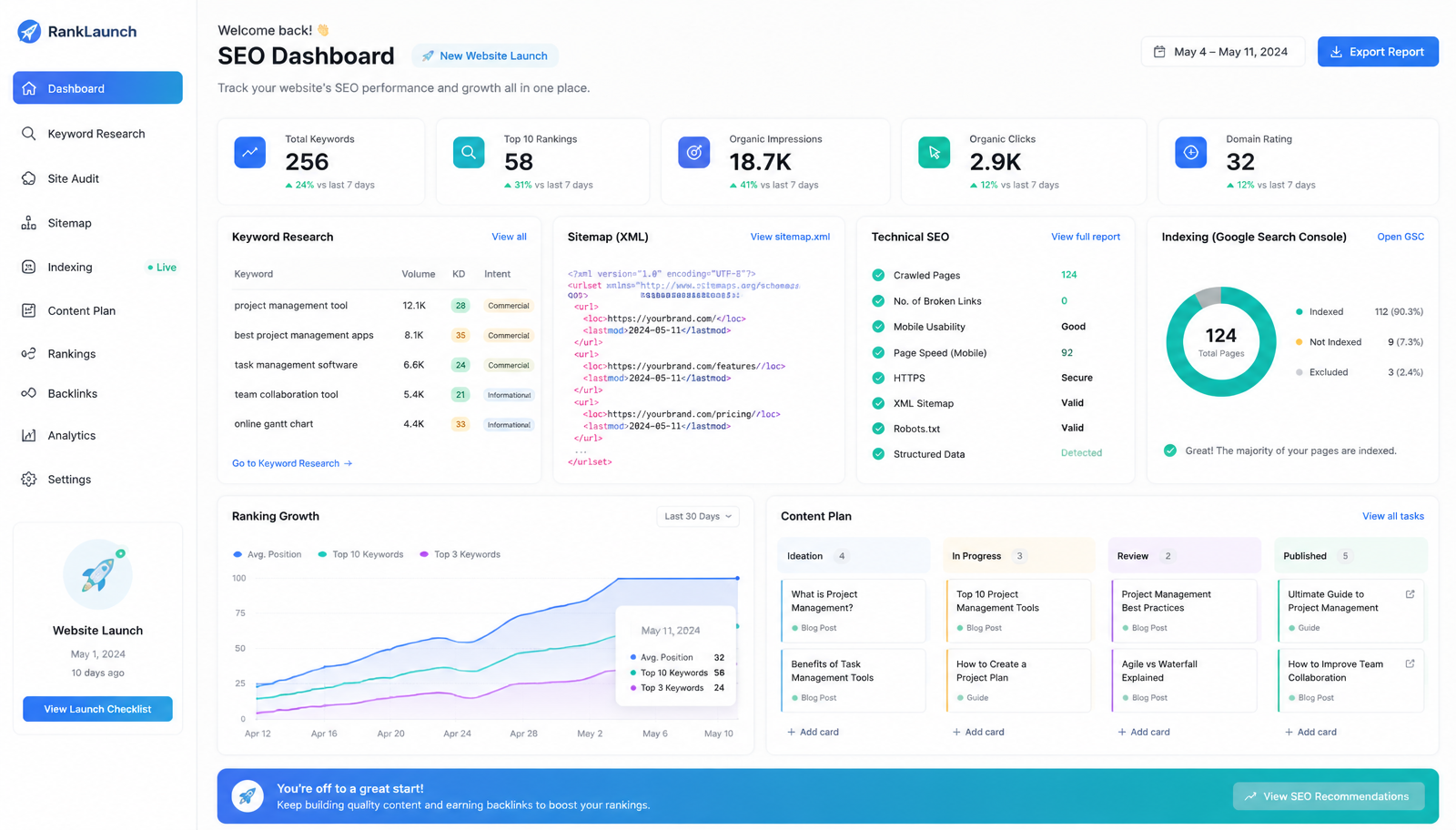
Use Google Search Console to monitor
- Indexing and sitemap submission
- Search queries, impressions and clicks
- Average position and page performance
- Coverage and crawl issues
- Mobile usability
- Manual actions
Use Google Analytics 4 to monitor
- Website traffic and sources
- User engagement and page performance
- Conversions and form submissions
- Purchase actions and lead events
- Campaign performance
Track important actions such as
- Contact form submissions
- Phone clicks
- WhatsApp clicks
- Email clicks
- Quote requests and bookings
- Demo requests and trial signups
- Product purchases
- Newsletter signups
Optimize Metadata For Every Important Page
Every important page on a new website should have a unique title tag and meta description. Metadata helps search engines understand the page and can influence whether people click your result in Google.
Service page metadata example
Title: Technical SEO Services | Fix Crawling, Indexing & Site Health
Description: Technical SEO services to fix crawling, indexing, Core Web Vitals, schema, redirects, canonicals, sitemap issues and technical barriers.
Local page metadata example
Title: SEO Services Los Angeles | LA SEO Agency For Leads & Growth
Description: SEO services in Los Angeles for businesses that want stronger Google rankings, Google Maps visibility, organic traffic, qualified leads and sales.
Blog metadata example
Title: SEO For New Websites | Complete Beginner SEO Checklist
Description: Learn SEO for new websites, including keyword research, technical SEO, site structure, content planning, indexing, internal links, schema, local SEO and ranking strategy.
Create Helpful Content For Search Intent
New websites often have thin content. They may explain the business briefly but fail to answer the questions users have before they contact or buy. Good SEO content should match search intent.
Informational intent
Users want to learn something — for example: how does SEO work, what makes a good website, how many keywords for SEO. See /blog/what-makes-a-good-website and /blog/how-many-keywords-for-seo.
Commercial intent
Users are comparing options — for example: best SEO agency for startups, technical SEO services, Shopify SEO consultant. See /blog/what-is-an-seo-agency for how buyers evaluate agencies.
Local intent
Users want a provider in a location — for example: SEO services New York, plumber near me, dentist in Chicago. See /services/local-seo and /google-map-seo.
Transactional intent
Users are ready to buy, book or request — for example: book consultation, request SEO audit, buy running shoes online.
Build Internal Links From The Start
Internal links help users and search engines move through your website. They also help show which pages are important.
A new website should link
- Homepage to main service pages
- Service pages to related services
- Blogs to relevant service pages
- Location pages to local SEO services
- Case studies to related services
- Product pages to related categories
- Category pages to important products
- Footer to key pages
- Blog posts to related blogs
- CTAs to contact or booking pages
Add Schema Markup Where Relevant
Schema markup is structured data that helps search engines better understand your website content. It does not guarantee rankings, but it can support clearer search understanding and richer search features where eligible.
Schema to consider for a new website
- Organization schema
- Website schema
- LocalBusiness schema
- Service schema
- Product schema
- FAQPage schema
- BlogPosting schema
- Article schema
- BreadcrumbList schema
- Review schema where valid and policy-compliant
Optimize Website Speed And Mobile Experience
New websites should be fast and mobile-friendly from day one. Many users will visit from mobile devices, especially when searching for local services, products, restaurants, healthcare providers, home services or quick answers.
Speed and mobile checklist
- Image compression and WebP
- Lazy loading for below-the-fold media
- Careful font loading
- Remove unused scripts
- Mobile layout and tap-friendly buttons
- Form usability on small screens
- Core Web Vitals and layout shift
- Hosting performance
- Third-party scripts
- Page builder and animation weight
Local SEO Setup For New Local Websites
If your new website is for a local business, local SEO should be part of the launch plan. Local SEO helps your business appear in Google Maps and local search results when nearby customers are looking for your services.
Local SEO checklist
- Google Business Profile with correct name, address and phone
- Main business category and services
- Business description and photos
- Reviews strategy
- Local citations
- Local landing pages and service-area pages
- Local schema
- Embedded map where appropriate
- Click-to-call buttons
- Local FAQs and internal links
eCommerce SEO Setup For New Online Stores
New eCommerce websites need SEO planning before product uploads get messy. Product pages, category pages, filters, collections, images, schema and internal links all affect how well an online store can rank.
eCommerce SEO checklist
- Category page structure
- Product page metadata and unique descriptions
- Collection pages
- Product and review schema where valid
- Image alt text and compression
- Internal links and breadcrumbs
- Faceted navigation and filter crawl control
- Duplicate variation handling
- Out-of-stock handling
- Page speed and mobile checkout experience
- Buying guides and product FAQs
Common SEO Mistakes New Websites Make
Launching without keyword research
Pages are created based on guesses instead of real search demand.
Having only one generic service page
A single services page may not be enough to rank for specific services.
No Google Search Console setup
The business cannot monitor indexing, queries, clicks or technical issues.
Duplicate metadata
Multiple pages have the same title tag or meta description.
No internal linking strategy
Important pages are not connected properly.
Thin location pages
City pages repeat the same text with only the city name changed.
Blocking Google by mistake
robots.txt, noindex tags or login restrictions stop important pages from being indexed.
Slow mobile pages
Large images, heavy scripts or poor layouts create a weak mobile experience.
No conversion tracking
The website gets traffic, but the business cannot see which visits become leads or sales.
Waiting too long to publish content
The website launches but has no plan for blogs, FAQs, guides or supporting content. See /services/small-business-seo and /services/ai-seo for how content and AI SEO fit together.
First 90-Day SEO Plan For A New Website
A new website does not need hundreds of SEO tasks at once. It needs a practical first 90-day plan that focuses on foundation, priority pages and early growth signals.
Days 1–30: Foundation and indexing
- Set up Google Search Console and GA4
- Submit the XML sitemap
- Check robots.txt and indexability
- Review canonical tags and metadata
- Fix broken links
- Review mobile performance
- Confirm tracking events
- Identify priority pages
Days 31–60: Page optimization
- Optimize homepage
- Optimize main service pages
- Optimize product or category pages
- Improve location pages
- Add internal links
- Improve title tags and descriptions
- Add FAQs where useful
- Add schema markup
- Improve content depth
- Fix remaining technical issues
Days 61–90: Content and authority growth
- Publish supporting blog posts
- Create content clusters
- Improve internal linking
- Build local citations where relevant
- Start ethical link building
- Monitor GSC queries
- Improve pages with impressions but low clicks
- Track leads and conversions
- Refine keyword targets
New Website SEO Checklist
Before and after launch, use this checklist to make sure your new website is set up to rank the right way.
Foundation
- Clear website structure
- Keyword research completed
- Main pages mapped to target keywords
- Homepage optimized
- Service, product, category and location pages optimized as relevant
- Unique title tags and useful meta descriptions
- One clear H1 per page and logical heading structure
- Clean URLs
Technical and indexing
- XML sitemap created and submitted
- robots.txt reviewed
- Canonical tags added
- No accidental noindex tags
- No broken internal links or important 404s
- Mobile-friendly design and fast page speed
- Images compressed with alt text
- Schema markup added where relevant
- Website is indexable
Tracking and content
- Google Search Console set up
- GA4 set up
- Conversion tracking set up
- Contact forms tested
- Phone and email links tested
- Blog / content plan created
- Internal links added between related pages
- Important pages included in the sitemap
Final Thoughts: New Website SEO Starts With A Strong Foundation
SEO for new websites is not about chasing rankings immediately. It is about creating a clean foundation that helps Google understand your website and helps users find the right information quickly.
Start with structure, keyword research, technical SEO, metadata, useful content, internal links, tracking and indexability. Then build supporting content, authority and ongoing improvements based on real data.
A new website can take time to gain visibility, especially in competitive markets. But if you build it correctly from the start, you avoid many of the problems that hold new websites back.